How It Works
You talk to your AI assistant. Your AI assistant talks to your tools. That's it.
The Flow
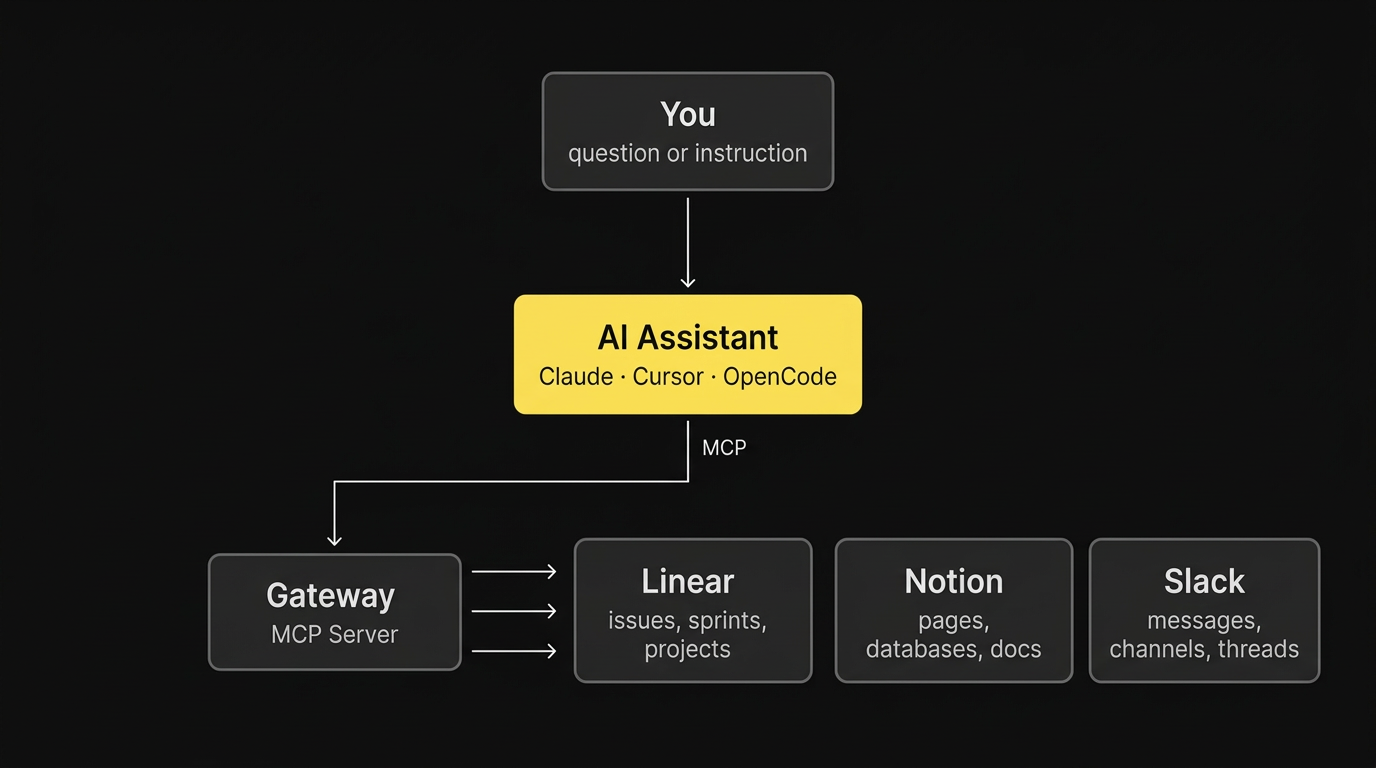
When you say "Find my Linear issues about the auth bug", your AI:
- Asks Gateway what's available
- Finds the right action (search Linear issues)
- Runs it and gets results
- Gives you a clean answer
You never interact with Gateway directly - your AI handles it all behind the scenes.
What Can It Do?
Gateway gives your AI access to 170 actions across seven providers plus built-in file storage:
| Provider | Actions | What Your AI Can Do |
|---|---|---|
| Linear | 24 | Search issues, create/update issues, manage sprints, add comments, assign work, track projects, initiatives |
| Notion | 21 | Search pages, read/write docs, query databases, manage blocks, create databases |
| Slack | 28 | Send messages, search conversations, manage channels, react to messages, read threads, DMs, upload/download files |
| GitHub | 40 | Manage repos, issues, PRs, branches, code, releases, actions, org teams |
| Telegram | 17 | Read/send messages and files, send GIFs/stickers/dice, download media, search chat history, contacts |
| Google Workspace | 22 | Gmail search/send, Calendar events, Drive files |
| Airtable | 14 | Query/create records, manage tables, fields, views |
| Gateway | 4 | Upload files, generate download URLs, list/delete files (R2-backed, signed URLs) |
Your AI discovers these automatically - you just describe what you want in plain language.
Authentication
Gateway supports two ways to connect:
- Automatic (Cursor, Claude Code) - Your editor handles login for you. Just click install and authorize when prompted.
- Token-based (any other tool) - Copy a config snippet from your dashboard. Works with any MCP-compatible client.
Both give you the same access. Your connected providers, your data, your permissions.
Privacy
- Interactive use - Gateway uses your OAuth tokens to call provider APIs on your behalf. You only see data you already have access to in each tool.
- Tokens are stored securely and never shared
- No data is indexed or stored beyond what's needed for the request
- File storage - Uploaded files are stored in private R2 buckets. Download URLs are signed and expire in 15 minutes. Files can be deleted at any time.