Security Model Reference
Technical reference for Gateway's execution security — token delegation, capability manifests, and D1 sandboxing.
For the non-technical version, see What Happens When You're Away.
Threat Model
The primary threat is prompt injection during autonomous execution. A malicious run input attempts to hijack the LLM into accessing resources beyond the procedure's scope — reading private Notion pages, posting unauthorized Slack messages, or exfiltrating data via provider tokens.
Secondary concerns:
- Users gaming procedures by reading internal evaluation criteria
- Cross-run data leakage between users
- Token misuse during multi-party procedure execution
D1 as Security Boundary
During execution, all run data (submissions, logs, state) lives in D1 — not in any provider. This is the core security property.
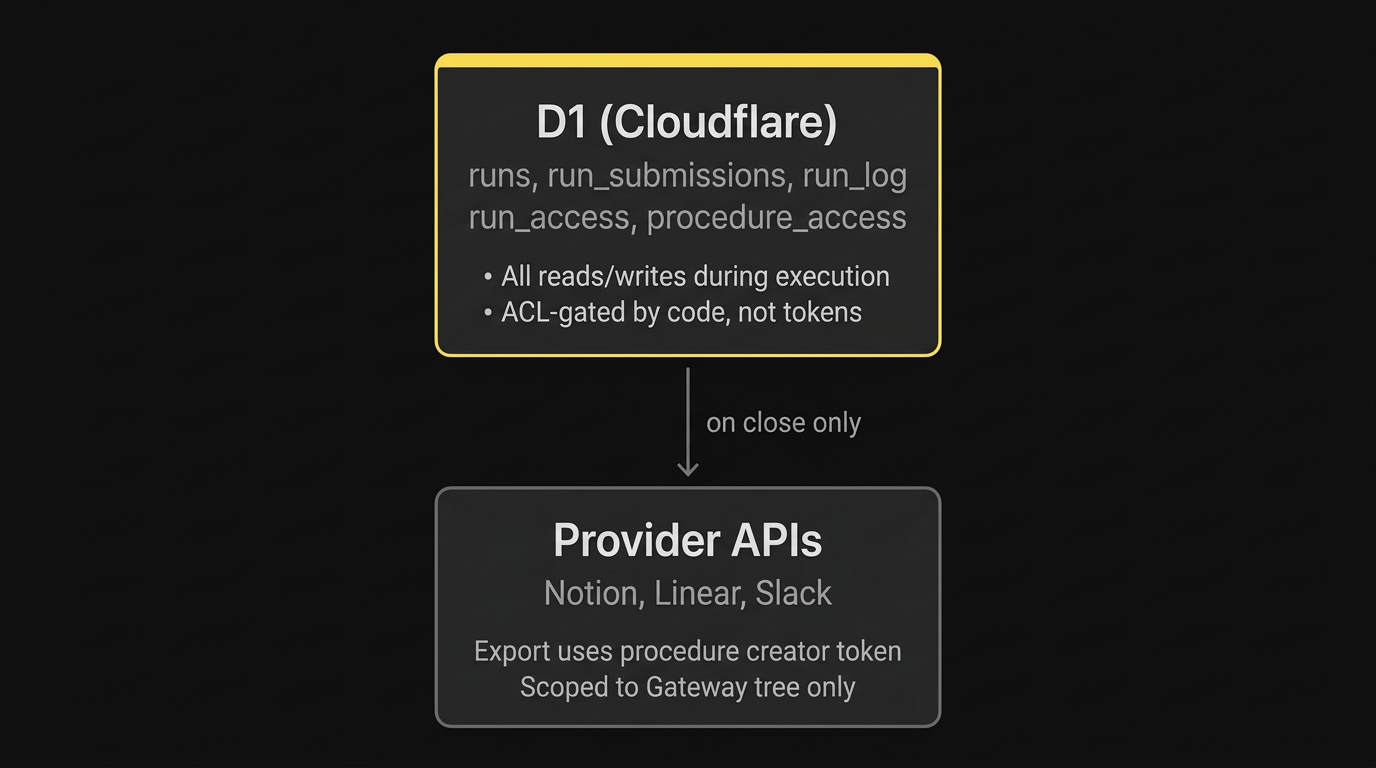
A prompt injection during step execution has no provider token in scope for D1 reads/writes. Provider tokens only fire for explicitly declared capabilities (Slack posts, Linear issues).
Token Delegation
Different tokens are used at different points in a procedure's lifecycle.
Interactive execution (user present)
| Action | Token used | Why |
|---|---|---|
| Read procedure from Notion | User's Notion token | User has read access to the procedure |
| Create run in D1 | N/A (internal) | No provider token needed |
| Post Slack message | User's Slack token | Message appears as the user |
| Create Linear issue | User's Linear token | Attribution to the user |
Autonomous execution (cron/Gemini)
| Action | Token used | Why |
|---|---|---|
| Read procedure snapshot | N/A (from D1) | Snapshotted at run creation |
| Read/write run state | N/A (D1) | Internal database, no provider token |
| Post Slack message | Workspace bot token | Message appears as "Gateway [BOT]" |
| Create Linear issue | Run creator's Linear token | Attribution to whoever started the run |
| Export to Notion on close | Procedure creator's Notion token | Scoped to their visibility in Notion |
Key constraints
- No user impersonation during autonomous execution. The bot token is clearly identified. The run creator's token is used for attribution only.
- No Notion reads during execution. The procedure document is snapshotted into D1 at run creation. Gemini works from the snapshot, not from live Notion.
- No provider token for D1 operations. Run data, submissions, and logs are stored in D1 with code-enforced ACL. No OAuth token can be hijacked to access them.
Notion integration access
The Gateway Notion integration can only access pages explicitly shared with it. In practice:
| Scenario | Access |
|---|---|
| Pages inside the Gateway → Procedures tree | Automatic — Gateway created them |
| Export databases created on run close | Automatic — Gateway creates them as children of the procedure page |
| Pages created manually outside the tree | No access — must be shared with the Gateway integration or moved into the tree |
This means procedure pages must live inside the Gateway-managed Notion hierarchy. The bootstrap flow (triggered on first Notion connection) creates a Gateway page with a Procedures child database. Everything inside that tree is accessible to both the procedure creator's token and the Gateway integration.
Token-Based Scoping
Rather than declaring explicit capability manifests in procedure documents, access is naturally scoped by the actor's tokens at each point in execution. The procedure document describes what to do; the token model constrains what's reachable.
Enforcement layers
Layer 1 — Token scoping: Each actor can only access what their OAuth token allows. The bot token can post to channels it's been added to. The run creator's Linear token only reaches their teams. The procedure creator's Notion token only sees their workspace.
Layer 2 — Prompt-level: The AI only receives the current step's instructions via get_run, never the full procedure source. The runner skill enforces a step-at-a-time execution model. This is a soft boundary — it relies on the LLM following the instructions faithfully — but the information surface is minimized.
Layer 3 — D1 ACL: Run data access is gated by run_access table joins. Even if prompt-level enforcement is bypassed, the SQL queries enforce who can read what.
Procedure Version Snapshots
When a run starts, the full procedure document is snapshotted into the run's D1 record. This means:
- Autonomous execution reads from D1, not from live Notion
- Procedure edits don't affect in-flight runs (until migration)
- The snapshot locks the procedure logic to the version that started the run
Version mismatch
| Scenario | Detection | Resolution |
|---|---|---|
| Minor edit (1.0 → 1.1) | LLM compares snapshot vs current on resume | Adapts — applies new step language going forward |
| Major edit (1.1 → 2.0) | LLM detects structural change | Sets needs_migration — admin review required |
| Procedure deleted | Run has snapshot, can still complete | Logged as orphaned; admin notified |
Slack Bot
Gateway is installed as a Slack app with bot scopes for autonomous execution.
Scopes
| Scope | Used for |
|---|---|
chat:write | Post messages as Gateway bot |
reactions:read | Poll for approval reactions |
channels:read | Resolve channel membership for groups |
users:read | Map Slack users to emails |
users:read.email | Get email addresses for cross-provider identity |
Token storage
Bot tokens are stored per Slack workspace in D1:
CREATE TABLE slack_workspace (
workspace_id TEXT PRIMARY KEY,
bot_token TEXT NOT NULL,
team_name TEXT,
created_at TEXT DEFAULT (datetime('now')),
updated_at TEXT DEFAULT (datetime('now'))
);User tokens (for interactive execution) remain in the linked_accounts table.